

Learn what a DP cable (DisplayPort cable) is, how to use a DP cable, learn the types of DP cables and how it works compared to HDMI.
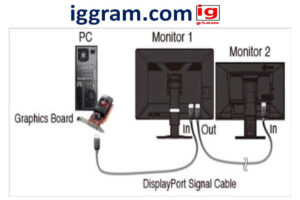

Introduction: Introduction to the DP Cable.
Whether you have ever had to plug in your monitor to a PC, a gaming console or a graphics card, you must have used either an HDMI cable or a DP cable. DisplayPort cable is a short name of the DP cable, which is a high-performance digital interface created by the Video Electronics Standards Association (VESA). It is created to provide high quality video and audio outputs among such devices as computers, monitors, and projectors.
The DisplayPort cable is now becoming a necessary component of the contemporary display technology, in 2025, when the screen resolution will be 4K, 8K, and possibly even greater refresh rates.
What Is a DP Cable Used For?
Displayport (DP) uses a cable that is mostly used to make a connection between a PC or laptop and a monitor. It carries quality video and audio signals and supports the following features:
- 4K and 8K resolution output
- When it comes to refresh rates, the higher the better (144Hz, 240Hz etc.).
- HDR (High Dynamic Range) Image support.
- NVIDIA G-Sync and AMD FreeSync technologies of Adaptive Sync.
- Multi-monitor displays Supported Multi-monitor displays via DisplayPort daisy-chaining (MST).
Being a gamer, a graphic designer or a content creator, the proper DP cable can significantly enhance the display performance and color quality.
The Difference between DP cable and HDMI.
The most frequent question among the users is: Which should I use DisplayPort or HDMI? Although the functions that they perform are similar, they differ in several ways:
| Feature | DisplayPort (DP Cable) | HDMI Cable |
| Primary Use | PCs and gaming monitors | TVs, consoles, and general media |
| Max Bandwidth (DP 2.1) | Up to 80 Gbps | Up to 48 Gbps (HDMI 2.1) |
| Max Resolution | 16K @ 60Hz | 10K @ 120Hz |
| Multi-Monitor Support | Yes (via MST) | Limited |
| Adaptive Sync | G-Sync, FreeSync | Variable Refresh Rate (VRR) |
| Connector Lock | Optional latch | Friction fit |
Verdict:
Display Port is preferable to other types of connection when connecting a PC to a monitor; particularly when playing video games or in work environments, since DisplayPort has higher bandwidth, refresh rates and can be connected to multiple displays.

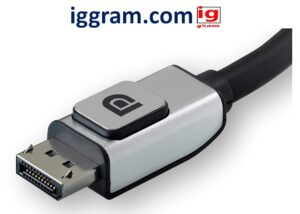
DP Cables: Types and Versions.
DisplayPort has been developed and new versions have improved the performance of the device. Here’s a quick breakdown:
- DisplayPort 1.2
- Supports 4K at 60Hz
- Bandwidth: 21.6 Gbps
- This is common with most mid-range monitors.
- DisplayPort 1.4
- Supports 8K at 60Hz or 4K at 120Hz
- Bandwidth: 32.4 Gbps
- Homeadds HDR10 andboldstream Compression (DSC).
- DisplayPort 2.0 and 2.1
- Supports up to 16K resolution
- Bandwidth: 80 Gbps
- Fits well in the next-generation gaming and professional editing systems.
- compatible with the older versions.
In 2025, the DisplayPort 1.4 or 2.1 certification is the standard to seek to purchase a DP cable to achieve the highest level of performance.
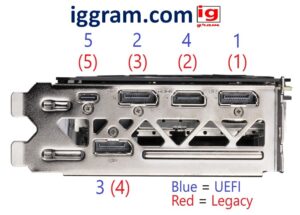

The identification of a good quality DP Cable.
DisplayPort cables do not come in equal varieties. The unbranded cables are cheap and can produce flickering or loss of signal or even can even break your port.
Here’s what to look for:
- VESA Certification: Provides the conformity to the weakness of DisplayPort.
- Gold Plated “Connectors: Enhances communication on the signal transfer and minimizes corrosion.
- Braided Shielding: Interference is avoided and protection is improved.
- Cable Length: This one should not exceed 2 meters (6.5 ft) in length.
- Version Label: Check whether it supports either DisplayPort 1.4 or DisplayPort 2.1.
The Benefits of displayport cable usage.
- Higher Bandwidth
The most recent Displayport 2.1 cables support 80 Gbps and this enables transmission of 8K and 16K material without any problems.
- Multiple Monitors
DisplayPort also has MST (Multi-Stream Transport) which allows connecting a series of monitors with a single port.
- Adaptive Sync
Gamer friendly- DisplayPort will have G-Sync and FreeSync technologies that prevent screen tearing.
- Backward Compatibility
DisplayPort versions are backward-compatible, and can be used with new DP cables with even older monitors.
- Audio & Video in One Cable
DisplayPort also supports audio and video as HDMI does without tangling cables.
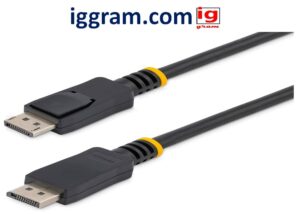

Best Use Cases for DP Cable in 2025
- PC Gaming: Racing: Need 4K or 8K high refresh gaming.
- Professional Editing: To reproduce colors and display high dynamic images.
- Creative Strategy: This applies to set-ups of gateways designed for use on a single landscape.
- Next-Gen GPUs: Additional modern graphics cards (NVIDIA RTX 4000, AMD RX 7000) have DisplayPort 2.1 ports.
How to Connect a DisplayPort Cable.
- You need to switch off your PC and your monitor.
- Insert one end of DP cable at the laptop or graphic card port.
- Plug the other one on your displayport monitor input.
- Turn on both devices.
- Go to your settings within the display system and choose the input at the DisplayPort.
Note: DisplayPort to HDMI adapters can only be used in monitors that do not have direct support of DP. This is however, likely to reduce refresh rate and resolution.
DisplayPort Future in 2025 and Beyond.
The DisplayPort 2.1 standard will capture the monitor connectivity market with the upward trend of AI-based graphics, 8K gaming, and ultra-high refresh rate monitors.
The further developments of VESA make sure that DP cables are the solution which will guarantee the performance and stability of your connection, as well as give it a future-proof feature.
FAQs
- What does DP cable stand for?
DisplayPort cable can be abbreviated as DP, and it is an interface used to transmit video and audio between a computer and a display using digital format.
- Is Display port superior to HDMI?
DisplayPort is indeed better than HDMI in terms of bandwidth, the number of monitors it can serve, and refresh rates among PC users.
- Can I use DP to HDMI adapters?
Adaptors are admittedly possible, though some features of the performance, such as Adaptive Sync or higher refresh rates, may be lost.
- Is StartPresent.net audio supported by DisplayPort?
DisplayPort also transmits audio and video, just as HDMI.
- What is the best display port cable used in gaming?
DisplayPort 1.4 or 2.1 cable is VESA certified as the optimal way to use it when playing the latest games in particular 4K or 8K display monitors.
Conclusion
The DP cable (DisplayPort cable) will still be a frontrunner in displays connectivity in 2025. The best display performance is provided with an exceptionally high bandwidth, refresh rates and future ready technology and consequently, it is favored by gamers, designers and professionals to provide the best display performance.
In case you are configuring a new personal computer or updating your own monitor, one of the best technological choices you can make is to invest in a good DisplayPort 1.4 or 2.1 cable.
Also read- Best 5- thing about bamboo 3D printer