
how to put all AI features on S10? A full AI-powered device, in our step-by-step guide. Add AI camera applications, voice assistants, smart keyboards, video editors, and creative apps to make your S10 smarter and more productive.

transform your Samsung Galaxy S10 into a smart machine. Here’s a step-by-step guide:
1. AI Camera Features
AI applications can be used to upgrade your S10 camera:
a) Google Camera (GCam)
Install a GCam APK on S10 (find the GCam 8.1/8.4 S10).
Night Sight, HDR+, AI scene detection.
Install → Permissions allowance → Open camera → Enjoy AI enhances.
b) AI Photo Enhancement Apps
Snapseed (Google) -Auto-corrects colours, sharpness, and uses AI filters.
Lightroom Mobile Auto tone, AI grading of colors.
Remini -ai photo upscaling and restoration.
c) AI Video Apps
CapCut AI video editing, auto captions, auto-cut.
InShot – Background remover and Smart filters.
2. AI Voice Assistants
a) Google Assistant
o Already on S10. Activate via:
Settings- Apps- Default Apps- Assist and voice input- Google.
o Or say: Hey Google- ask anything.
b) Amazon Alexa
o Download from Play Store.
o Smart home control, reminders, and Smart responses.
c) Bixby AI
o An inbuilt helper of Samsung.
o Create routines: Settings-Advanced Features- Bixby Routines.
3. AI Keyboard & Typing
- Install gboard or Microsoft swift key.
- Features:
Predictive text
Emoji suggestions
AI swipe typing
- Enable: Settings → General Management → Keyboard → Gboard/SwiftKey → Enable AI features
4. Artificial Intelligence Editing and Productivity Applications.
a) Photo & Video
Lensa AI – Face, background removal.
PicsArt- AI filters and effects.
Canva – AI-based design and content-creating.
b) Text & Writing
ChatGPT App / Bing AI / Bard- Text generation, summarization, creative AI writing.
Grammatically Keyboard- An AI-based email, document, and social media writing assistant.
5. AI System Features
Optimizations in built-in AI of enable S10
- Adaptive Battery & Performance:
o Settings- Battery- Adaptive Battery.
- Device Care AI:
o applications Settings- Device Care -Optimize now -AI manipulates storage, performance and battery.
- Digital Wellbeing AI Suggestions:
o Settings- Digital wellbeing -Suggestions.
6. AI Creativity Apps
- Art and Design: Dream by Wombo, DALL. mini.
- Music AI: Soundful, Boomy – Grow music – Make AI compositions.
- AI utilities: FaceApp, DeepL (AI translator), Otter.ai (AI transcription).

Practical Benefits
- Improved Productivity: AI applications are used to automate normal activities and help in writing, editing, and communication.
- Exponential Creativity: The app of AI powered photo, video, arts and music activates creativity without prohibitive hardware.
- Smartter Usage: AI-based system capabilities enhance battery, performance and wellbeing digital.
- Longer Life of your Device: Using artificial intelligence optimizations will make your S10 feel new and stronger, extending its life.
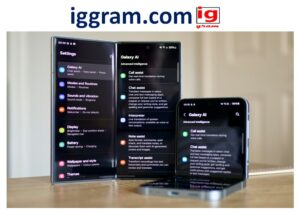
How to maximum power AI on S10.
- Make sure that you upgrade your apps with the newest AI features.
- Timing Third-party applications can be used when your hardware does not support a certain feature.
- Turn on AI capabilities within every application (the majority of AI features are also optional, placed in apps).
Built-In AI System Features
- Adaptive Battery -Settings -Battery-Adaptive Battery.
- Device Care AI- Settings – Device Care – Optimize now.
- Digital Wellbeing AI Suggestions- settings- Digital wellbeing – Suggestions.
Extra Tips
- Always update all apps with the new AI capabilities.
- Grant access permissions to access camera, microphone and storage.
- Intensive AI-based applications such as video editors and AI image upscalers can be used with an SD card.
- Test AI-centered APKs (such as GCam mods) to features that Samsung never provided on the S10.

Installation & Setup Tips
- Unblock Unknown sources: Settings Allowing unknown sources Allow browser or file manager to install APKs.
- All permission: Camera, microphone, artificial intelligence applications storage.
- Use SD Card: SD Card is needed to use heavy AI apps such as video editors or AI photo upscalers.
- Test Every App: Have valid functionality following AI features after installation.
Output: Once you are done with all these applications and hacks, your Galaxy S10 will consist of:
- AI-powered image and video editing.
- State-of-the-art AI voice assistants.
- Intelligent writing and typing devices.
- AI creativity software in art, design and music.
- AI performance and battery system-optimizations.
Last Point: Although the S10 might not be as powerful as the raw AI processing of the newest phones, this configuration is an effective way to unlock most AI features on a phone which is multiple generations old. With a combination of third-party apps, tweaks on the AI system, and smart usage habits, your S10 is the complete, AI enhanced, device that is ready to take pictures, create content, be productive, and smartly automate.
Conclusion
With the help of the steps and the suggested apps provided in the Extra AI Features Pack, your Samsung Galaxy S10 can be turned into a smartphone with AI that is closer to the functionality of modern flagship mobile devices. Although not all of the latest AI-powered features might be enabled on the S10 hardware itself, third-party applications and smart settings can make you replicate and expand AI functionality in various functions.
With the given installation, you can now make your Samsung Galaxy S10 virtually operate like an AI flagship of the 21st century. Enhanced photography, video editing, voice assistants, and smart keyboards, creativity tools, and productivity applications together with AI on your device will have:
- Even smarter camera features including AI scene recognition and photo improvements.
- Intelligent video editing with AI in auto-cuts, captions and effects.
- Voice recognition and voice command assistants, home automation, and smart home.
- Predictive keyboards and writing AI assistants.
- Art, music, and content creation AI tools create all the content with ease.
Battery, performance and digital wellbeing optimizations: System level artificial intelligence.
Although the hardware of the S10 will not be as fast as the latest AI chips in other, newer phones, all of these applications and features will allow you to enjoy most of the AI functions, causing your device to be smarter, faster, and more productive.
Tips: Use all applications up to date and search in every application AI settings to achieve optimal performance.
Also read- simple 5-steps how to ai rig a model for vtubing?

